Access denied. You must login to view this page.
Instructions: Add the code to the "Source" page of the editor and then edit content as needed in the normal view as needed.
Buttons Take Course <span class="action-link"><a class="submit" href="YOUR_URL_HERE">Take Course</a></span> |
Return icon <ul class="course-nav-return-menu"><li class="first last" style="list-style-type: none;"><a href="https://learn.unclcn.org" id="course-nav-return-link" style="text-decoration: none;">Return Home</a></li></ul> |
Drop down menu +Drop down menu - This is example text.
- More example text.
- All the example text!
<details><summary><span style="color:#000000"><strong>+<u> Drop down menu</u> </strong></span></summary><p>This is example text.</p>
|
Hiding sectionsRemoving Bottom Navigation Bar<style type="text/css"> #region-course-bottom {display:none;} </style> Remove Course Progress Menu<style type="text/css"> .region-course-sidebar {display:none;} #main-content, #content {width: 100%!important;} </style> Page Title<style type="text/css"> #title-container {display:none;} </style> |
Display MessagesGreen Check Banner<div class="info messages" role="alert"><div class="pdm-status pdm-message-wrapper">Custom Message</div></div>
Warning Banner<div class="info messages" role="alert"><div class="pdm-warning pdm-message-wrapper">Custom Message</div></div>
Error Banner<div class="info messages" role="alert"><div class="pdm-error pdm-message-wrapper">Custom Message</div></div>
|
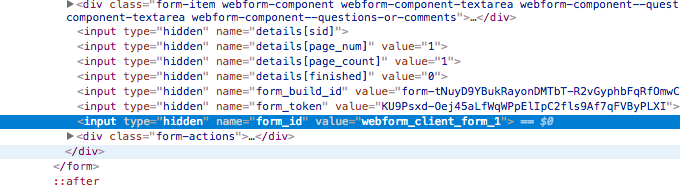
Add CAPTCHA to webform 1. Navigate to the webform and inspect a field (right click → Inspect)
2. Search "form_id" and find the value "webform_client_form_##"

*There will be other values that also contain "form_id", only use the one that is "webform_client_form_##". This is usually the last search item*
3. Go to CAPTCHA admin page
4. Add the value "webform_client_form_##" into the column for form_id 5. Set Challenge Type as default
6. Save |